Notice: file_put_contents(): Write of 127 bytes failed with errno=122 Disk quota exceeded in /home/u432326315/domains/fq101.co.uk/public_html/libraries/vendor/joomla/filesystem/src/File.php on line 279
Notice: file_put_contents(): Write of 127 bytes failed with errno=122 Disk quota exceeded in /home/u432326315/domains/fq101.co.uk/public_html/libraries/vendor/joomla/filesystem/src/File.php on line 279
Notice: file_put_contents(): Write of 127 bytes failed with errno=122 Disk quota exceeded in /home/u432326315/domains/fq101.co.uk/public_html/libraries/vendor/joomla/filesystem/src/File.php on line 279
Notice: file_put_contents(): Write of 127 bytes failed with errno=122 Disk quota exceeded in /home/u432326315/domains/fq101.co.uk/public_html/libraries/vendor/joomla/filesystem/src/File.php on line 279 ESP switch in a fortwo 450
Notice: file_put_contents(): Write of 127 bytes failed with errno=122 Disk quota exceeded in /home/u432326315/domains/fq101.co.uk/public_html/libraries/vendor/joomla/filesystem/src/File.php on line 279
Notice: file_put_contents(): Write of 127 bytes failed with errno=122 Disk quota exceeded in /home/u432326315/domains/fq101.co.uk/public_html/libraries/vendor/joomla/filesystem/src/File.php on line 279
Notice: file_put_contents(): Write of 127 bytes failed with errno=122 Disk quota exceeded in /home/u432326315/domains/fq101.co.uk/public_html/libraries/vendor/joomla/filesystem/src/File.php on line 279
Notice: file_put_contents(): Write of 127 bytes failed with errno=122 Disk quota exceeded in /home/u432326315/domains/fq101.co.uk/public_html/libraries/vendor/joomla/filesystem/src/File.php on line 279
Notice: file_put_contents(): Write of 127 bytes failed with errno=122 Disk quota exceeded in /home/u432326315/domains/fq101.co.uk/public_html/libraries/vendor/joomla/filesystem/src/File.php on line 279
Notice: file_put_contents(): Write of 127 bytes failed with errno=122 Disk quota exceeded in /home/u432326315/domains/fq101.co.uk/public_html/libraries/vendor/joomla/filesystem/src/File.php on line 279
ESP switch in a fortwo 450
Until now switching the ESP off has required a G1 Trust plug which on a G2 sadly kills the ABS as well.
The Roadster has a ESP button to 'numb' the traction control while retaining the ABS, the Roadster and the G2 Fortwo are both controlled by a SAM unit so we set about finding the wiring to retro fit the switch.
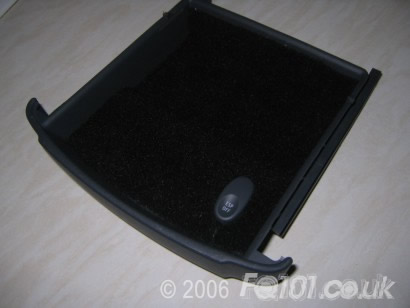
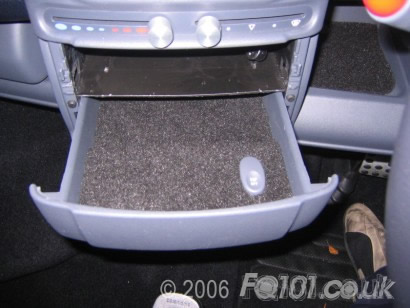
After tracing the switch on a Roadster wiring loom and finally found the relevant wires to tap into, After mounting the switch neatly in the under stereo draw it all looks pretty tidy.